momodi CLI released: start research and retrieve reports from your terminal and AI assistant
Momodi released the momodi CLI and MCP server (npm 0.1.1) to start research, track progress and fetch HTML reports from a terminal or AI assistant.
Product promotional visual | Bring research into your work. (AI-assisted artwork)

If you already work in a terminal or an AI coding assistant, a business question that needs checking usually means opening a web page, explaining the background again and then moving the report back into the project you were working on. With several tasks going, it is also easy to lose track of which report belongs to which question.
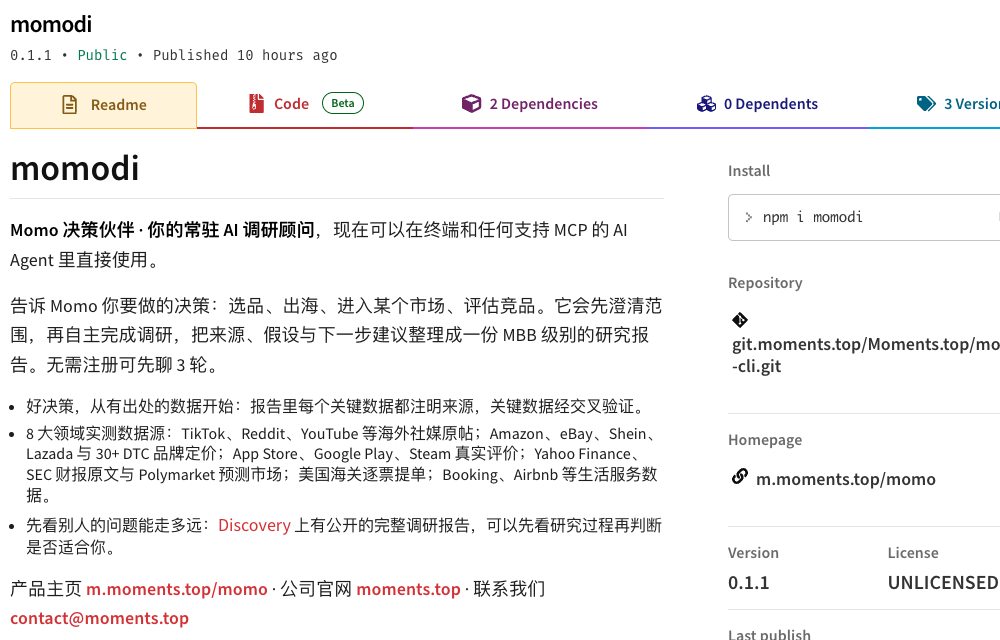
Momodi published momodi on npm on 18 October 2026; as of 19 October the current version is 0.1.1. The package provides two entry points — a command line and an MCP server — so users can start research, check progress and retrieve reports from a terminal or from an AI assistant that supports MCP.
What changes is the entry point: research results can go straight into an existing workflow with less manual switching and copying. It is not a research model that runs offline on your computer, and a different entry point does not bypass account permissions or research credits.
Figure 1 | Screenshot of the public npm release page, taken on 19 October 2026, showing version 0.1.1.
Who should use it, and who should just open the web page
If you do market research occasionally and like to chat as you read, use the Momo web app; there is no need to learn the command line for this update.
CLI means operating a tool by typing commands in a terminal. It suits people who already use terminals, scripts or AI coding assistants. For example, you are putting together a competitor proposal and want to chain “submit research, check progress, save the report,” then drop the report into the project folder for a colleague to review.
MCP (Model Context Protocol) is a way for AI assistants to connect to external tools. Once connected, the assistant can call Momo to submit research, check progress and read results. For the user, the difference is that you can hand off the task within your current assistant instead of typing every command yourself; the exact configuration depends on the assistant you use.
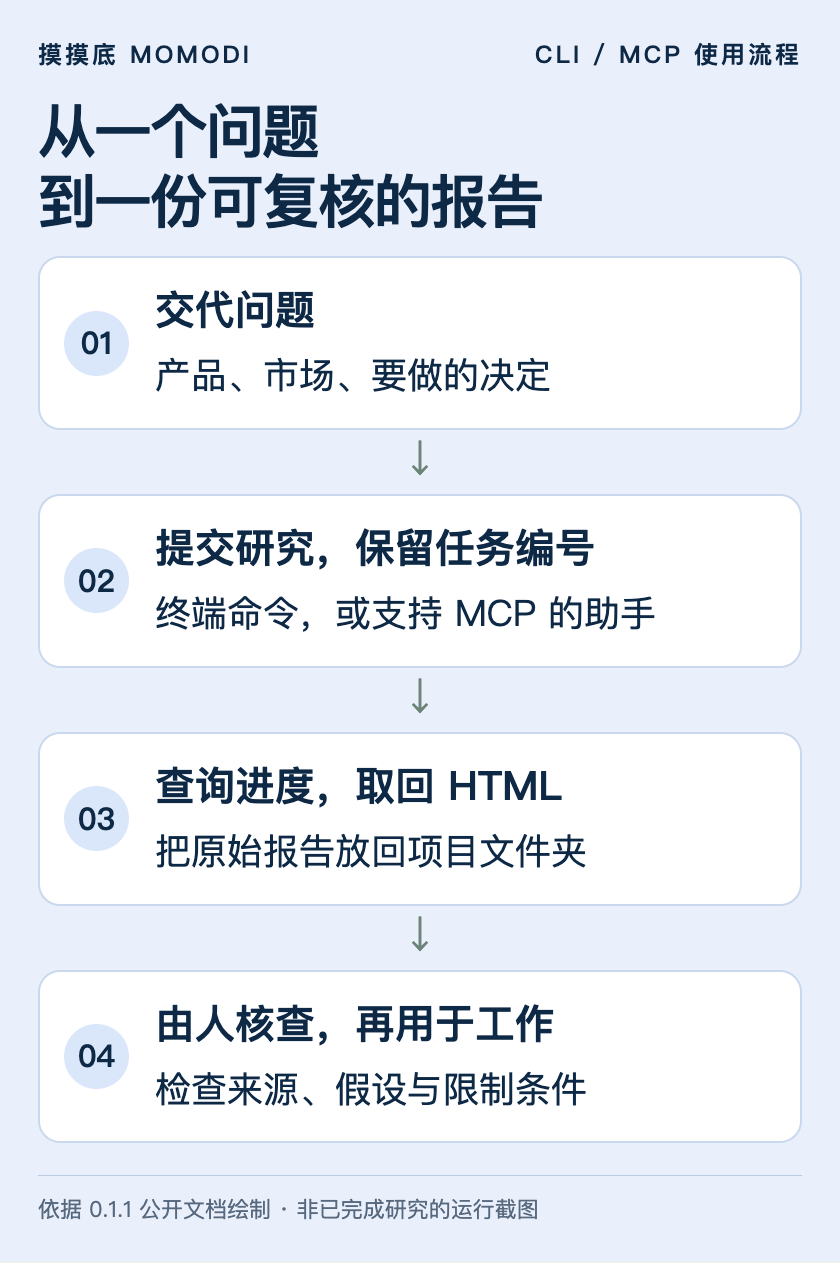
Figure 2 | How research flows back into work: state the question, keep the task ID, retrieve the report, then have a person check it. This is a process diagram.
Try a small question first, then decide whether to wire it in
It requires Node.js 20 or later. If Node.js is installed, you can run this in a terminal to try the anonymous clarification first:
npx -y momodi@0.1.1 try "I plan to sell portable coffee machines in Singapore. Help me clarify what needs researching first; don't start formal research."The version is pinned to 0.1.1 here so it matches this post. The anonymous trial gives 3 rounds of chat for clarifying the question; it is not a free formal research run.
We also need to report how the current version behaved in testing. On 19 October we tested the same scenario and received a clarifying reply about product form, target customer, channels and costs; then, when fetching the remaining trial rounds, an HTTP 400 error appeared and the command exited with a non-zero status. If you hit the same issue, use the web entry point first. Automation scripts also should not treat “a reply appeared” as success for the whole command; check the exit status and the error message as well.
We did not run a full formal research job this time, so we cannot claim formal reports have been verified end to end, and a single clarification reply must not be taken as a market conclusion.
With an account: keep reports at hand instead of copying them back and forth
After logging in, you can generate a key on the API key settings page. It is a credential that lets a tool use your account. The plaintext is shown only once; store it in your own secure environment and never put it in public code, screenshots or group chats.
After setting the key as the environment variable MOMO_API_KEY as described in the npm documentation, first run:
npx -y momodi@0.1.1 whoamiOnce the account is confirmed, submit a question you have already thought through. The following is an example of the command, not research we have run:
npx -y momodi@0.1.1 research "Compare the main portable coffee machine competitors and channels in Singapore and the costs to verify before a trial sale; separate confirmed information from assumptions" --tier standard --out singapore-coffee.htmlWhen research finishes, the report is saved as an HTML file you can open in a browser. Include the topic or date in the file name so later tasks don’t overwrite a file with the same name.
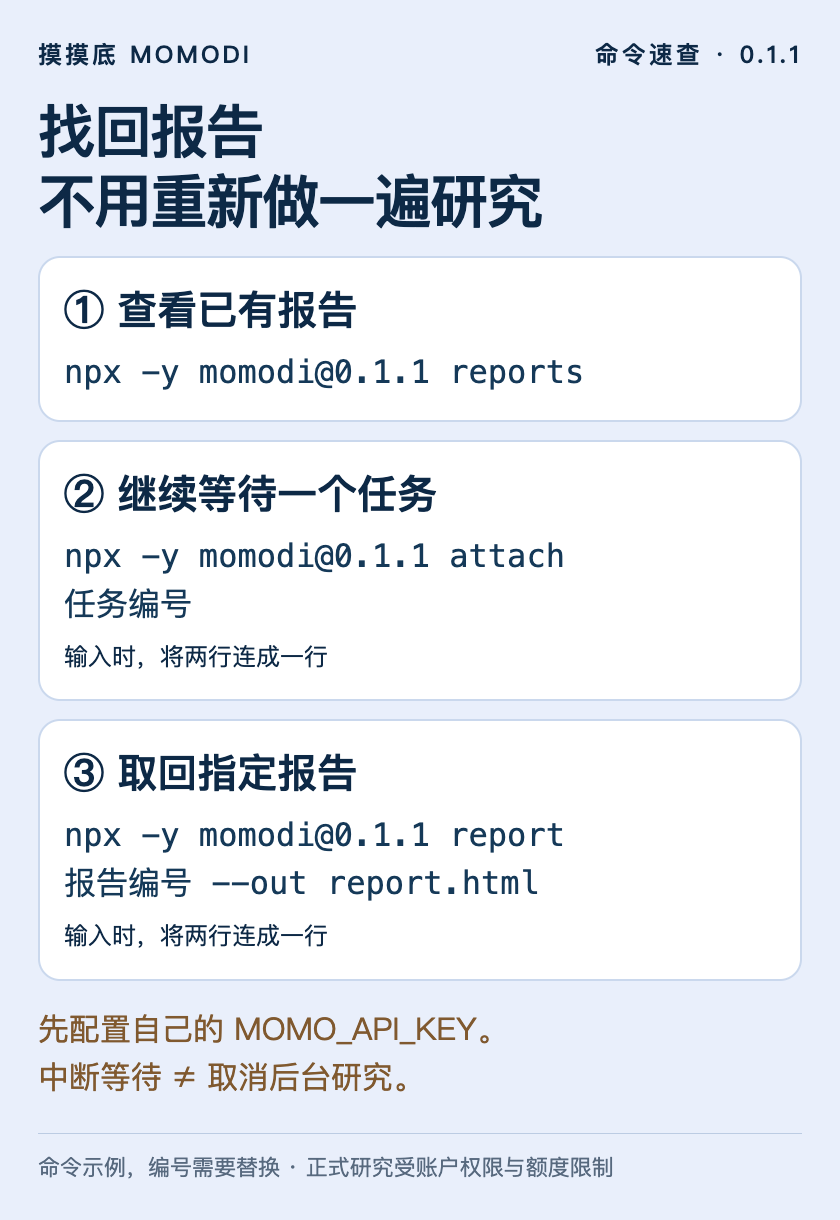
If you don’t want the terminal to keep waiting, add --no-wait --json and note the returned task ID. Then use attach with that ID to resume checking. Interrupting the terminal wait does not cancel the background research, so there is no need to resubmit just because you closed the window.
Existing reports can be listed with reports and retrieved with report plus the report ID. The direct benefit for team work: keep the task ID and the original report at handoff, so a colleague knows exactly which material they are reviewing.
Figure 3 | Three common commands. Replace the task and report IDs in the image with your own; commands shown across several lines should be typed as one line.
Let an AI assistant continue, but keep a human check
The package’s momo-mcp server provides four tools: start research, check research status, read a report and list reports. MCP-capable hosts can launch it in their own configuration format:
npx -y -p momodi@0.1.1 momo-mcpConfigure MOMO_API_KEY for this server as well. This launch command does not by itself complete installation for any given assistant; see the npm documentation for details.
Break the work into an order that is easy to check: state the business question, wait for the research to finish, retrieve the original report, then ask the assistant to map each important conclusion to its sources, assumptions and items still to be verified. Finally, a person opens the key sources and checks whether they are outdated and whether they apply to their own market.
A report can still be misread once it enters an AI assistant. Don’t let a downstream assistant drop the caveats in its summary, and don’t assume that because it can read reports automatically, it can decide on purchases or investments automatically.
Know these limits before you integrate
- One account can run only one research job at a time. Queue multiple topics instead of submitting duplicates in parallel.
- Formal research is limited by a daily token quota. A token is a unit for measuring the text and other content a model processes; available usage is shown in your account, and installing the npm package does not grant unlimited research.
- CLI formal research offers two tiers: standard and deep. The web app’s Quick take does not produce a formal report, so it is not offered as a CLI report tier.
- Reports are currently HTML. It should not be advertised as supporting direct export to Word, Excel or PDF.
- This is an online service. It connects to
m.moments.topby default, and research tasks are sent to the server. Before submitting internal material, confirm what your organization allows to be shared and how.
For people with an existing technical workflow, the momodi CLI offers a more convenient entry point for research. To judge whether it is worth integrating, start with one small task: can you keep a record of the research, find the original report, and let the next person know which conclusions still need checking?
Versions, commands and limits were checked against the public npm package 0.1.1 on 19 October 2026. We inspected the published package and ran one anonymous trial chat; full paid research and complete flows in each MCP host have not yet been verified. Feedback: contact@moments.top.
Related
- Momo decision partner update: clarify the question first, then research for the business — Momodi updated Momo, its decision partner for product, export and competitor calls: it clarifies product, market and constraints first, then cites sources.
- AI agent — An AI agent is a program that plans its own steps, calls tools and adjusts based on results to reach a goal, rather than just generating a block of text.